Install and Use Krnl Executor on iOS: Easy Guide [2026 Update]
The Roblox modding scene is notoriously difficult to navigate on mobile devices, especially given Apple’s “walled garden” approach to software execution. Krnl has long been a staple for desktop users looking to run complex scripts, and the demand for a mobile counterpart has led to specific workarounds for iPhone and iPad users. Unlike a standard App Store download, getting an executor to function requires bypassing certain system restrictions.
Navigating the installation of third-party tools on iOS requires a balance of caution and technical setup. While the desktop version of Krnl is a powerhouse, the iOS environment demands specific sideloading techniques or specialized mobile builds that mimic its functionality. This guide breaks down how to bridge the gap between your mobile device and high-level script execution without compromising your hardware.
How to use Krnl Executor for iOS?
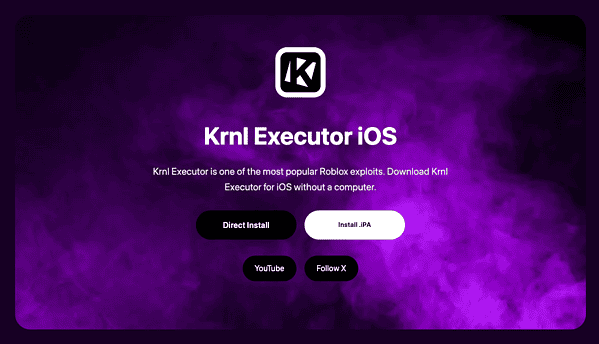
To use Krnl-style execution on iOS, you must first secure a compatible IPA file and a sideloading utility like AltStore or Sideloadly. Since iOS does not natively support .exe files or unsigned scripts, the “Krnl for iOS” experience is typically delivered through a modified version of the Roblox client that has the executor engine injected into it. Once the modified client is installed and trusted in your system settings, you can open the in-game menu to paste and execute your desired scripts.
1. Preparing Your Device for Sideloading
Before you can run any custom scripts, your iPhone or iPad must be configured to accept applications from outside the official App Store. This process does not necessarily require a jailbreak, but it does require a computer to sign the app certificate.
- Download the latest Krnl iOS IPA file from a verified community source.
- Install AltStore on your Mac or PC.
- Connect your iPhone to your computer via USB.
- Open AltStore and select “Install AltStore” on your connected device.
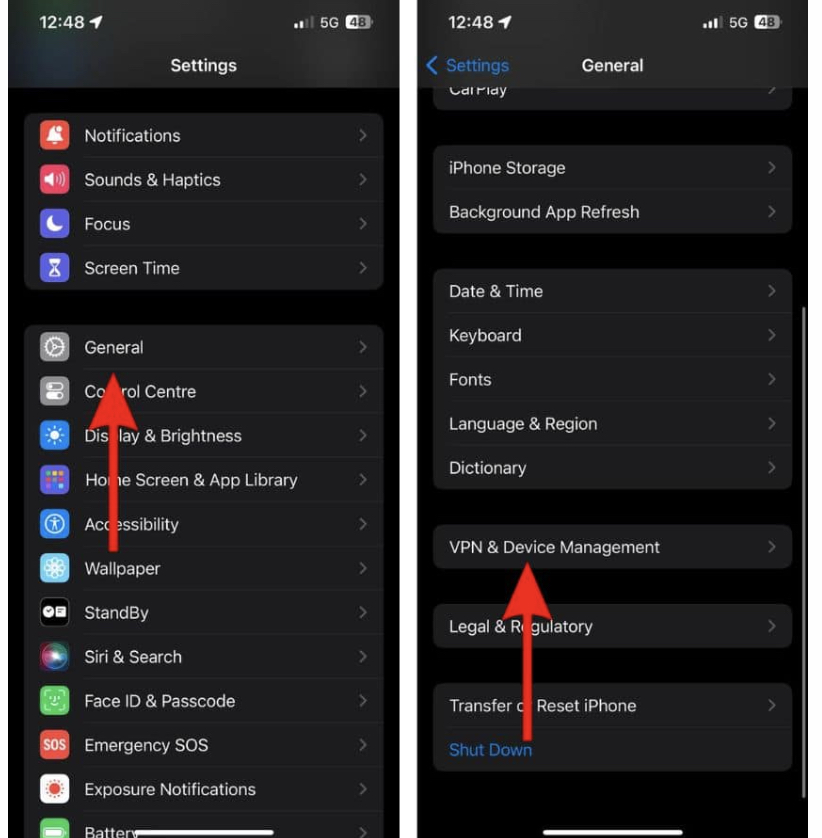
- Navigate to Settings > General > VPN & Device Management on your iPhone to “Trust” your Apple ID developer profile.
2. Installing the Krnl IPA via AltStore
Once your device is prepared, the actual installation of the executor takes place within the AltStore app on your phone. This ensures the app is properly “signed” by your Apple ID, allowing it to run for seven days before needing a refresh.
- Open the AltStore app on your iOS device.
- Tap the + icon in the top left corner of the My Apps tab.
- Select the Krnl IPA file you downloaded earlier.
- Enter your Apple ID and password if prompted to sign the app.
- Wait for the progress bar to complete; the Krnl icon will then appear on your Home Screen.
3. Executing Scripts in Roblox Mobile
With the modified client installed, you can now enter a game and utilize the script hub. Most mobile executors feature a floating icon or a hidden gesture to pull up the console where you input code.
- Launch the newly installed Roblox app.
- Log in to your account (it is recommended to use an “alt” account for safety).
- Join a game and wait for the assets to load.
- Tap the Krnl floating logo to open the executor window.
- Paste your script into the text box and tap Execute or Inject.
4. Technical Performance Highlights
Running an executor on mobile puts significant strain on the device’s CPU, particularly when handling complex scripts with multiple “threads.” On M-series iPads, this performance is negligible, but older iPhones may experience thermal throttling. Users should how to use krnl executor for ios with an understanding that high-density scripts can lead to crashes if the memory overhead exceeds the app’s limit.
- Script Compatibility: Supports most Luau-based scripts used in the desktop version.
- Injection Method: Uses dynamic linking to hook into the game process at runtime.
- Resource Management: Optimized to minimize battery drain compared to older mobile exploits.
- Security Layer: Often includes a built-in “Anti-Ban” toggle to mask script execution from basic server-side checks.
Essential Safety Tips
- Avoid “No Key” Scams: Many sites claim to offer a version of Krnl that doesn’t require a key; these are often malware. Stick to official community channels.
- Manage Storage: If your device is low on space, the app might fail to sign. You can fix macOS system data huge issues or clear cache on your mobile device to free up room.
- Two-Factor Authentication: Always keep 2FA enabled on your main account, even if you are using an executor on a secondary one.
- Driver Awareness: If you are using a Windows PC to sideload, ensure you install apple mobile device driver windows 11 so your computer can communicate with your iPhone.
- Check Model Compatibility: Ensure your device can handle the game’s requirements by checking what iphone model do i have to verify RAM specs.
Mastering Mobile Modding
Using an executor on iOS is a multi-step process that demands patience and a bit of technical savvy. While it isn’t as “plug-and-play” as the desktop experience, the ability to run scripts on the go is a major advantage for power users. By following the sideloading path, you bypass Apple’s restrictions and open up a new level of customization for your mobile gaming experience.
FAQs?
While the tool itself is used by many, downloading from unverified sources carries risks of malware. Always use a secondary account to avoid permanent bans on your main Roblox profile.
No, you can use sideloading tools like AltStore or Sideloadly to install the necessary IPA files without fully jailbreaking your device.
Free Apple developer accounts only sign apps for one week. After this period, you must connect your phone to your computer and refresh the app in AltStore.
Most scripts written in Luau will work, but those requiring specific desktop-only libraries or high-end processing may crash the mobile app.
Ensure your device has enough storage, your USB cable is secure, and you have trusted the developer profile in your iPhone’s General settings.

0 Comments