How to Move Search Bar to Top on iPhone? 2026 Guide
If you want to move the search bar to the top on iPhone, “come over here”, as they say in Mortal Kombat. Recent iOS updates changed the placement of several search bars, moving them to the bottom of the screen in apps like Safari, Messages, and Settings.
Apple introduced this change to improve one-hand usability on larger devices like the iPhone Pro Max models. Still, many users prefer the old layout. This guide explains how to move the search bar back to the top where possible, plus a few workarounds when Apple does not provide a setting. You can also check related iPhone interface changes such as how to restore accidentally closed browser tabs if your browsing layout feels different after an update.
Why Is the Search Bar at the Bottom on iPhone?
Apple redesigned several interface elements in newer iOS versions. The search bar in many apps is now positioned near the bottom to make it easier to reach with your thumb on larger screens.
Unfortunately, Apple does not provide a system-wide option to move those search bars back to the top for:
- Messages
- Notes
- Settings
However, there are still some exceptions and customization options you can use for SAFARI.
Move the Safari Search Bar to the Top
Safari is the main app where Apple still allows users to reposition the address and search bar.
Switching to the classic layout moves the search field to the top of the browser window.
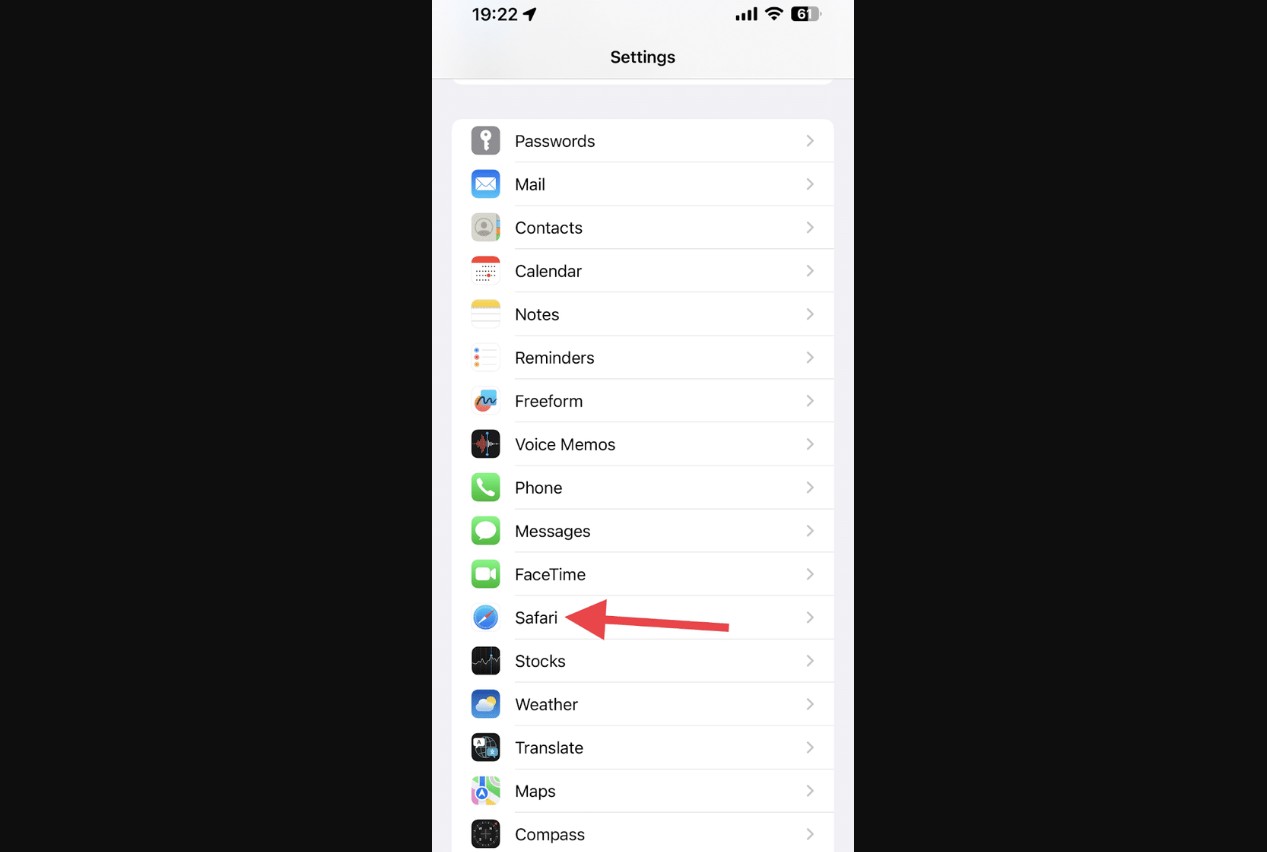
- Open Settings on your iPhone.
- Scroll down and tap Safari.
- Locate the Tabs section.
- Select Single Tab.
Once you reopen Safari, the search and address bar will appear at the top of the screen.
If you later want the bottom layout again, simply switch back to Tab Bar in Safari settings.
Move the Safari Search Bar From Inside the Browser
You can also change the search bar position directly from Safari without opening Settings.
This method is faster if you want to switch layouts while browsing.
- Open Safari on your iPhone.
- Tap the AA icon on the left side of the address bar.
- Select Show Top Address Bar.
The browser immediately switches to the top search bar layout and keeps it that way even after restarting Safari.
This option works on many iOS versions including iOS 15, iOS 16, and newer builds.Adjust the Home Screen Search Button
If the extra search button on the Home Screen bothers you, you can remove it. This does not move the search bar, but it helps reduce visual clutter.
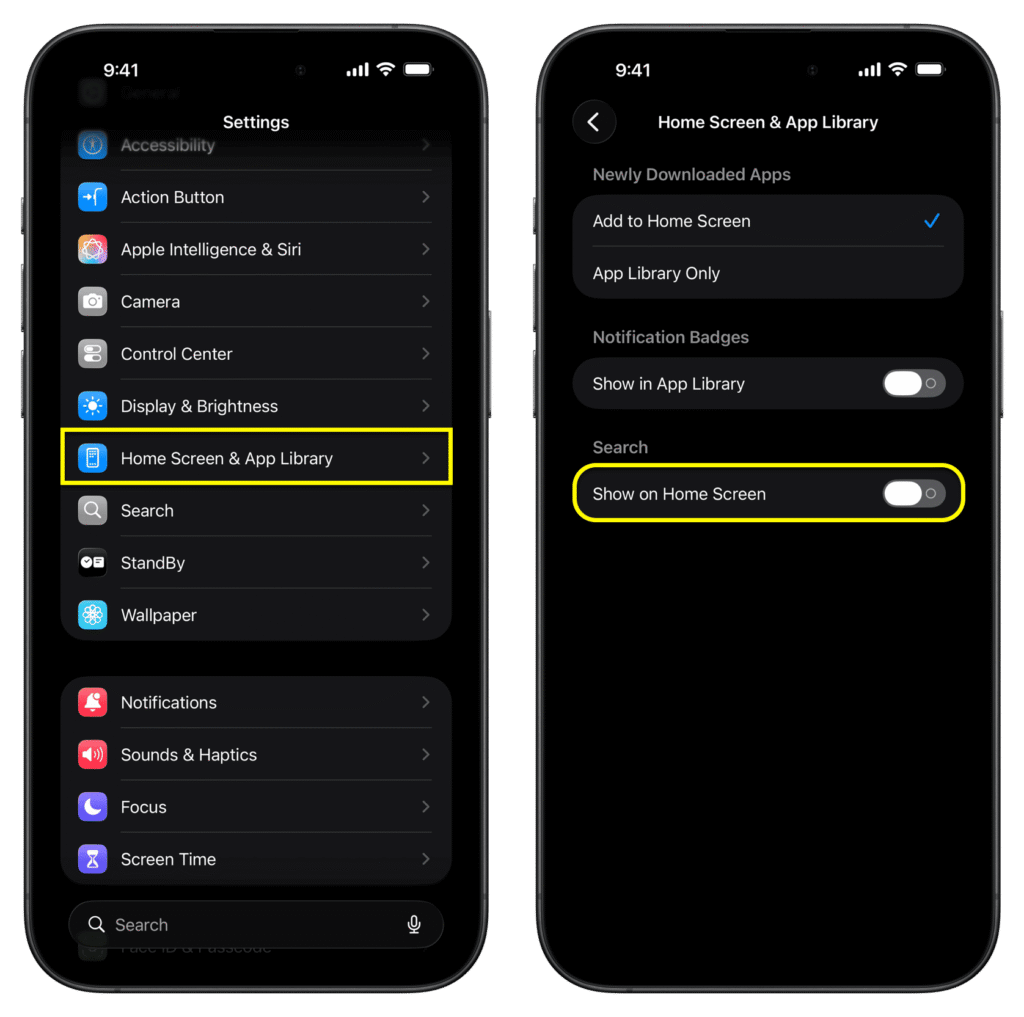
- Open Settings.
- Tap Home Screen.
- Toggle Show on Home Screen off.
You can still access Spotlight search by swiping down anywhere on the Home Screen.
Spotlight is one of the fastest ways to search apps, contacts, emails, or files. It is similar to how Spotlight Search works on Mac, which you can learn more about when exploring tools like taking a screenshot on a Mac or navigating macOS faster.
Use Spotlight Search Instead
When search bars appear at the bottom inside apps, Spotlight is often the fastest workaround.
Instead of scrolling inside an app to reach the search field, you can launch a system-wide search instantly.
- Go to the Home Screen.
- Swipe down from the middle of the screen.
- Type your search term.
Spotlight can find apps, contacts, notes, messages, and files across your entire device.
It also integrates with Siri suggestions, which makes it easier to quickly access recent documents, contacts, or frequently used apps.
Check for App-Specific Settings
Some apps provide their own layout options, though this is not common.
If an app recently updated its interface, it may include new customization options.
- Open the app where the search bar moved.
- Look for a Settings or More menu.
- Check for layout or display options.
Unfortunately, most Apple apps like Messages and Notes do not offer this option yet. Their search bar position is fixed by design.
Update iOS if the Search Layout Looks Bugged
Occasionally, interface bugs can cause the search bar to appear incorrectly.
Updating your iPhone can resolve layout glitches or missing options.
- Open Settings.
- Tap General.
- Select Software Update.
- Install any available update.
Many UI issues are fixed in minor iOS updates. For example, Safari layout bugs have occasionally appeared after updates and were later resolved with patches.
Tips
• Enable Reachability in Accessibility settings if you struggle to reach top elements on large iPhones.
• Use Spotlight Search instead of scrolling inside apps to find content faster.
• Keep iOS updated to avoid interface bugs affecting Safari or system apps.
• Send feedback to Apple through the Feedback Assistant if the layout bothers you.
• Try alternative browsers like Chrome or Firefox if you prefer more toolbar customization.
Make iPhone Navigation Feel Familiar Again
Apple’s design changes aim to improve one-hand usability, especially on larger devices. Still, many users prefer the classic layout with the search bar at the top.
The good news is that Safari still allows you to switch layouts in seconds. For other apps, the position is currently fixed, but using Spotlight search or adjusting Home Screen settings can make navigation easier.
With a few small tweaks, you can restore a browsing and search experience that feels closer to older iOS versions.
Key Takeaways
Apple moved many search bars to the bottom of the screen in recent iOS versions to improve one-hand usability. However, this design change cannot be reversed in most built-in apps like Messages or Notes. Safari remains the main exception, where users can move the search bar back to the top through Settings or the browser menu. This guide helps iPhone users customize their layout and find practical workarounds.
FAQs
No. Apple currently allows repositioning only in Safari. Other apps like Messages, Notes, and Settings have the search bar fixed at the bottom.
Apple redesigned many interfaces to make them easier to reach with one hand, especially on larger iPhones.
No. Safari’s setting only applies to the Safari browser. Other apps keep their own layout.
Yes. Swipe down on the Home Screen to open Spotlight Search. This lets you search apps, contacts, files, and messages instantly.
Apple has not announced plans for a universal toggle yet. Many users have requested it through feedback channels, so future iOS updates may introduce more customization.

0 Comments