Easy Guide: How to Set Up NetMirror on iPhone?
If you want to set up NetMirror on iPhone, you might be surprised that there is no official iOS app. Instead, NetMirror works through a Safari-based shortcut that behaves like a web app on your home screen. This method lets you access the streaming portal without searching for the website every time.
In this guide, you will learn how to install NetMirror on iOS using Safari, how the shortcut works, and what alternatives you can use if the service stops working.
To get the best experience with iPhone features and settings, you can also check practical Apple tips like learning how to connect an iPhone to a Windows PC or how to back up your iPhone safely before installing third-party services.
Why Is NetMirror Not Available as an iOS App?
NetMirror is not distributed through the Apple App Store. Instead, it works as a web-based streaming portal that mirrors content from various OTT platforms.
Because of this structure, iPhone and iPad users cannot install it like a traditional app. Instead, the platform relies on a Safari shortcut that behaves like a Progressive Web App (PWA). This shortcut loads the latest working NetMirror domain automatically, which is useful because the site address often changes.
Another reason for the browser-based approach is that unofficial streaming services often cannot pass App Store review policies.
1. Add NetMirror to the iPhone Home Screen
The easiest way to use NetMirror on iOS is by saving the streaming site as a home screen shortcut. The icon behaves almost like an app and opens directly in Safari.
- Open Safari on your iPhone.
- Visit the NetMirror streaming portal.
- Tap the Share button in the Safari toolbar.
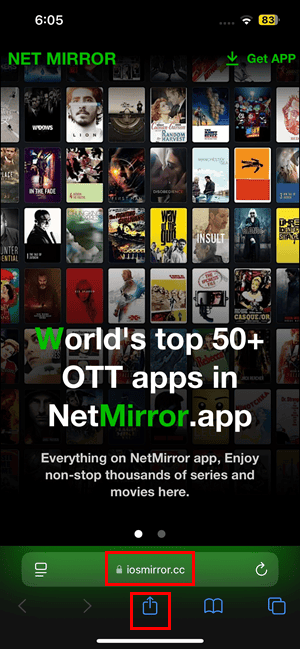
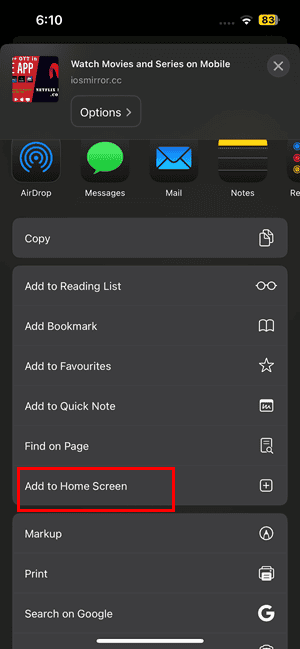
- Scroll through the options.
- Tap Add to Home Screen.
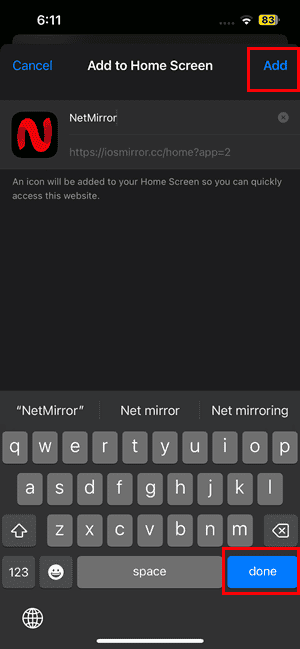
- Keep the default name for the shortcut.
- Tap Done on the keyboard.
- Tap Add in the top-right corner.
- Return to the Home Screen.
- Tap the NetMirror icon to launch the portal.
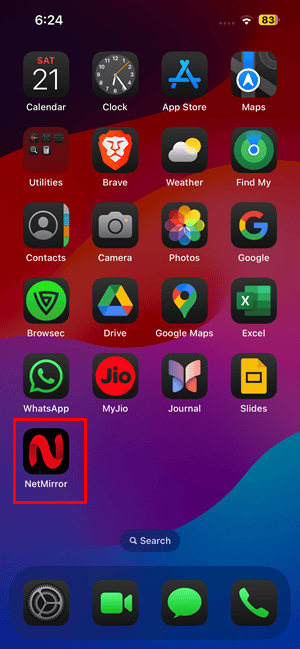
Once created, the shortcut opens the latest working NetMirror page automatically. Even if the domain changes, the redirect system typically points to the updated portal.
2. Use a WebView Browser App (Optional)
Some users prefer opening NetMirror in a dedicated WebView app to get a more full-screen interface.
- Open the App Store.
- Search for a WebView browser app such as Dodo.
- Install the app.
- Open the WebView browser.
- Enter the NetMirror website address.
- Enable Full Screen Mode.
- Enable Auto Rotation.
- Enable HTTPS/SSL protection.
- Tap Open WebView.
This method launches the streaming portal inside a full-screen browser container. It can sometimes improve navigation and playback controls depending on the app you use.
Is NetMirror Safe or Legal?
NetMirror mirrors content from subscription streaming platforms such as Netflix, Prime Video, and Disney+. Because it aggregates content from third-party sources without official agreements, the legality can vary depending on local copyright laws.
There are also potential security considerations:
- Streaming links may come from external sources
- Websites may frequently change domains
- Some portals may include ads or trackers
For privacy and security, avoid downloading unknown files and consider using trusted streaming platforms when possible.
NetMirror Alternatives on iPhone
If NetMirror stops working, or you simply prefer official streaming platforms, there are several legitimate alternatives available on iPhone and iPad. These apps provide large libraries of movies, TV shows, and live channels without relying on mirror sites or unofficial sources.
Most of these services are available directly through the App Store and work reliably on iOS devices. Some are completely free with ads, while others offer premium subscriptions that unlock additional content such as live sports and original series.
Quick Feature Comparison
| App | Best For | Key Content | Pricing |
|---|---|---|---|
| Pluto TV | Free live TV streaming | Live TV channels, classic shows, movies | Free |
| Peacock | Premium shows and sports | NBC shows, originals, live sports | Starts at $7.99/month |
| Tubi | Large free movie catalog | Thousands of movies and TV shows | Free with ads |
Tips
– Always open NetMirror using Safari because other browsers may not support the home screen shortcut properly.
– If the shortcut stops working, remove it and recreate the home screen icon.
– Use a stable internet connection to prevent buffering issues.
– Keep iOS updated to ensure Safari web apps run smoothly.
– If streaming links fail, refresh the portal or try another mirror link.
Watching Movies on iPhone Without Hassle
Setting up NetMirror on iPhone is simple once you understand that it works as a Safari web shortcut rather than a traditional app. Creating the home screen icon gives you fast access to the streaming portal without searching for a working website each time.
However, because the platform relies on mirrored content, availability and reliability may change. If the portal stops loading or redirects to a different domain, simply recreate the shortcut or try one of the legal streaming alternatives mentioned above.
If you are exploring more iPhone tricks, you might also find it helpful to learn how to fix an iPhone that is not charging or how to transfer files from iPhone to Windows.
Key Takeaways
NetMirror on iPhone works through a Safari shortcut instead of a downloadable app. Users create a home screen icon that loads the streaming portal like a web application. The setup takes only a few minutes and does not require jailbreaking or sideloading. If NetMirror becomes unavailable, alternative streaming apps such as Pluto TV, Peacock, and Tubi provide safer options.
FAQs:
No. NetMirror is not available on the Apple App Store. Instead, iPhone users create a Safari shortcut that launches the streaming site.
No. The Safari home screen method works on standard iOS devices and does not require jailbreaking.
Many mirror streaming platforms rotate domains frequently. The Safari shortcut usually redirects to the latest working site automatically.
Yes. The same Safari shortcut method works on both iPhone and iPad devices.
Yes, NetMirror is free to access, but it may rely on third-party content sources and may not be legal in all regions. Always check your local regulations before using such services.


0 Comments