How to Unlock the Secret Live Radar Built Directly Into Your iPhone’s iMessage?
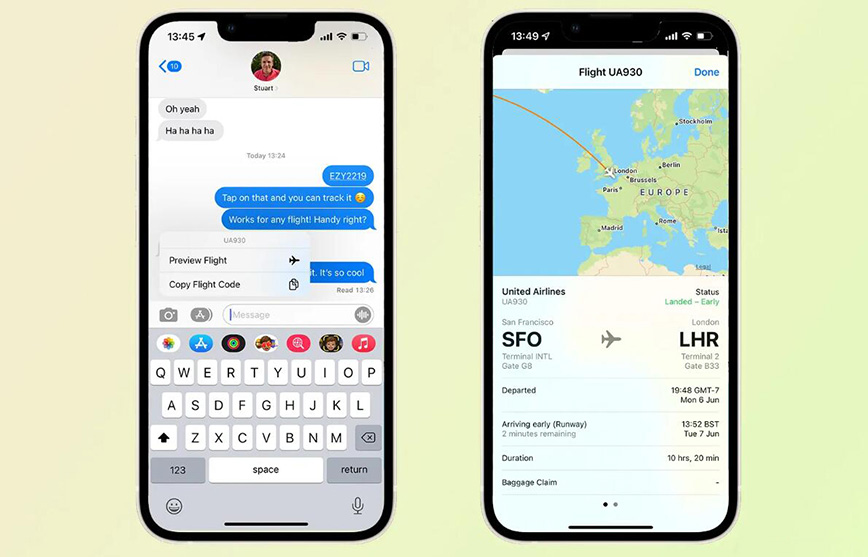
If you are an iPhone user who travels frequently or often picks up friends and family from the airport, you might be carrying a powerful tool in your pocket without even knowing it. While many travelers rely on clunky third-party apps or refreshing airline websites, a “secret” feature built directly into iOS allows you to track any flight in real-time through a simple text message.
Here is everything you need to know about the iMessage flight tracker and how to use it for your next trip.
The Power of “Data Detectors”
Apple uses a technology called “Data Detectors” to scan text for specific patterns like dates, phone numbers, and addresses. This same tech can recognize flight numbers, instantly turning a standard text bubble into a live, interactive flight radar.
How to Activate the Tracker
Tracking a flight is as simple as sending or receiving a text. You don’t even need to be the one flying; as long as the flight information is in your chat history, it works.
Time needed: 3 minutes
Here is a quick step-by-step guide on how to activate the tracker:
- Format the Message
Type the airline name (or its two-letter code) followed by the flight number. For example: “Delta 1234” or “DL1234.”
- Send and Tap
Once the message is sent or received, the flight number will become underlined.
- The Long Press
Tap and hold (or simply tap) the underlined text. A menu will appear with the option to “Preview Flight.”
- View the Map
A window will pop up showing a live map of the plane’s progress, along with specific flight details.
What Can You See?
The preview isn’t just a static image; it is a live dashboard. Users can access:
- Real-time Flight Path: See exactly where the plane is over the ocean or land.
- Departure & Arrival Stats: Check if the flight is on time, delayed, or has already landed.
- Gate and Terminal Info: No more squinting at airport monitors, the app shows you exactly which gate to head toward.
- Baggage Claim: Once the flight lands, the tracker often displays the specific carousel number for luggage.
Pro-Tips for Power Users
- It Works Across Devices: This feature isn’t limited to the iPhone. You can use the same trick in the Mail and Notes apps, or on your Mac and iPad.
- Spotlight Search: If you don’t want to send a text, you can swipe down on your Home Screen and type the flight number directly into the Spotlight Search bar for a quick result.
- The 24-Hour Rule: Keep in mind that flight data is usually only available for flights departing within the next 24 hours. If you try to track a flight weeks in advance, the system may say “Flight information unavailable.”
The Bottom Line
In an era of “app fatigue,” this built-in shortcut is a breath of fresh air. It saves storage space, battery life, and most importantly, time. Next time you’re heading to the airport, skip the App Store and just check your messages.




0 Comments