MacOS 27 Removes Menu Icons Apple Added Just Last Year
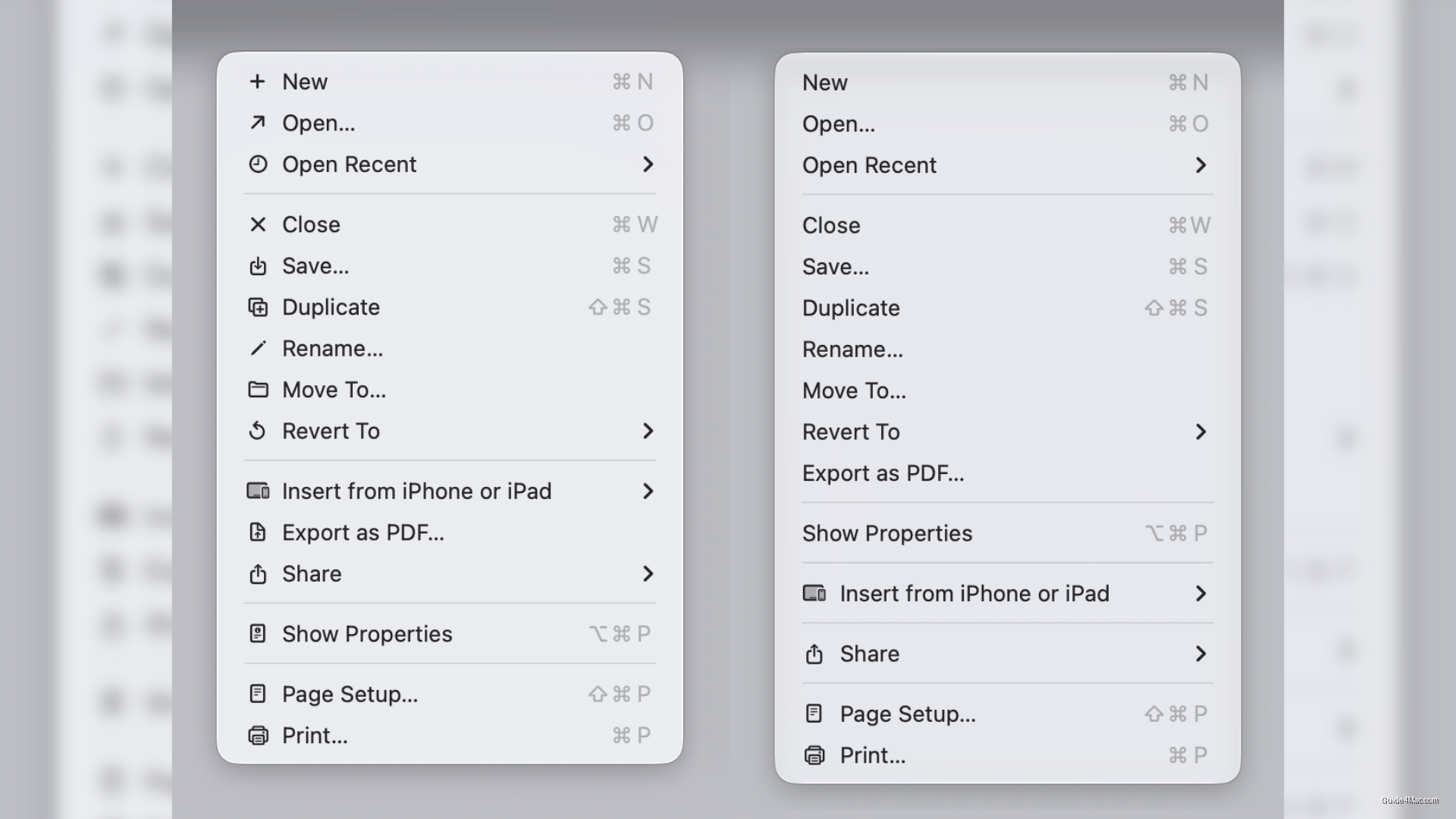
What You Need to Know
- MacOS 27 Golden Gate removes most menu icons Apple added in macOS 26 Tahoe.
- Tahoe’s menu icons were inconsistent across apps, making menus harder to scan.
- Golden Gate keeps icons only for file locations, devices, and frequently used actions.
- Updated Human Interface Guidelines direct developers to use menu icons sparingly and purposefully.
Apple quietly walked back one of macOS 26 Tahoe’s more polarizing decisions: the small icons that appeared next to nearly every menu item across Apple’s apps are largely gone in macOS 27 Golden Gate, currently in developer beta.
The reversal is faster than Apple’s usual pace for design corrections. Tahoe shipped with icons spread across menus in Mail, Finder, Safari, and most first-party apps, and the design community pushed back almost immediately. The complaint was not that icons existed, but that they were inconsistent: different apps used different icons for identical actions, and many symbols did not clearly map to their functions, making menus harder to scan rather than easier.
Developer Nikita Prokopov posted before-and-after screenshots on Mastodon that show the difference plainly. Golden Gate strips most of those icons out, keeping them only where they carry actual meaning, such as file locations, connected devices, and frequently used actions. Apple has also updated its Human Interface Guidelines to match, telling developers to use menu icons sparingly and with purpose rather than by default.
What this means for third-party apps
The guidelines update matters beyond Apple’s own software. Developers who added icons throughout their menus to match Tahoe’s aesthetic now have explicit direction to pull back. How many actually revise their apps before the fall release is an open question, since guideline changes do not force updates the way API changes do.
Golden Gate is available to developers now, with a public beta planned for next month and a broader release expected in fall 2026. The timeline means Apple has roughly one cycle to land on a menu design it can hold, after spending one full release going in a direction it is now visibly retreating from. That is not catastrophic, but it is an unusual admission that the original call was wrong.




0 Comments