Honest NordVPN for Mac Review (2026): Real Tests on M1 MacBook

I tested NordVPN on a MacBook Air M1 running the latest version of macOS to see how it performs in real, everyday conditions. VPNs are no longer niche tools reserved for technical users. In fact, around 1 in 4 internet users globally now use a VPN for privacy, streaming, or security.
That matters because expectations have changed. People don’t just want a VPN that works, they want one that is fast, simple, and reliable enough to run in the background without friction.
This review is based on real usage, not feature lists or marketing claims. I focused on speed, stability, usability, and how well NordVPN actually integrates into macOS during daily tasks like browsing, streaming, and working across networks.

Quick overview of Nord VPN for MAC
NordVPN is one of the easiest VPNs to use on Mac, and performance is consistently strong. It is especially good for streaming and general browsing. However, it is not perfect. Some advanced users may find it a bit limited, and pricing becomes less attractive after renewal.
Pros:
- Fast connection speeds in most regions
- Very simple interface
- Reliable for streaming services
- Strong default security setup
Cons:
- Pricing jumps after the initial plan (well, still very affordable, but some could consider that 1$ gap)
- Occasional reconnect delays after sleep (if you are an OCD Macbook user)

Is Nord VPN different on Mac than on PC?
NordVPN on macOS is not identical to its Windows version. There are two ways to install it, either through the App Store or by downloading it directly from their website. The direct version typically offers more features and faster updates as it alsways has the latest build from Nord VPN themselves. I installed that one.
macOS also handles VPN permissions differently. During setup, you need to approve configuration changes at the system level. This is standard behavior, but it adds an extra step compared to other platforms.
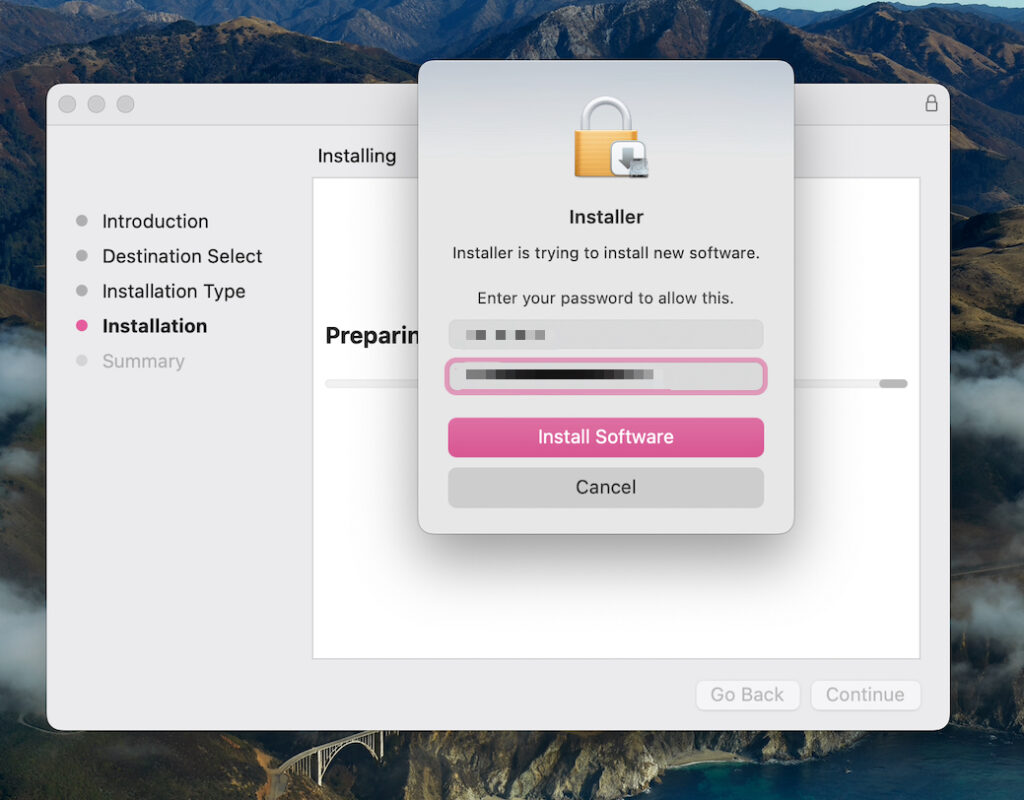
The app integrates cleanly with macOS, but it does not feel deeply native. It works well, but it is still clearly a cross-platform app.

Nord VPN Setup and installation on Mac
Installation takes less than five minutes(even if shows more). After downloading and logging in, the app asks for permission to add VPN configurations. Once approved, you are ready to connect.

There are no complicated steps or technical barriers. This is one of the smoothest VPN onboarding experiences on Mac.

Nord VPn for Mac Interface and user experience
The interface is clean and minimal. You can connect using the map or by selecting a server from a list. Most users will rely on the quick connect button, which automatically chooses the best server.
Switching servers is fast, and the app responds quickly. The menu bar icon is useful for quick actions without opening the full app.
That said, the map interface feels more visual than practical. After a while, the server list becomes the preferred way to navigate.

Speed test results
I tested NordVPN using a standard fiber connection. Speeds were measured with and without the VPN.
Without VPN, the connection was at full speed. With a nearby server, the drop was minimal and barely noticeable during browsing or streaming. Long-distance servers showed a larger drop, but performance was still usable.
NordLynx, which is NordVPN’s WireGuard-based protocol, makes a clear difference here. It keeps speeds high while maintaining stability.

Here is the speed after I tested with a Barcelona connection (not the biggest one, but here, in Italy, is a bit problematic to have a huge speed).

Nord VPN on Mac Streaming performance
NordVPN works reliably with streaming platforms. I tested it with Netflix and YouTube, and both worked without issues.
Content loaded quickly, and there were no buffering problems. Switching regions also worked as expected.

This is one of NordVPN’s strongest areas on Mac.
Stability and reliability
During daily use, the connection remained stable most of the time. There were no random disconnects during active browsing or streaming.
One issue appears when the Mac wakes from sleep. Occasionally, the VPN takes a few seconds to reconnect. It is not a major problem, but it is noticeable. If your Mac becomes unresponsive or overloaded during heavy usage, you might run into system errors like your system has run out of application memory mac error, which can also affect background apps like VPNs.
Overall reliability is very solid.
Battery impact on MacBook
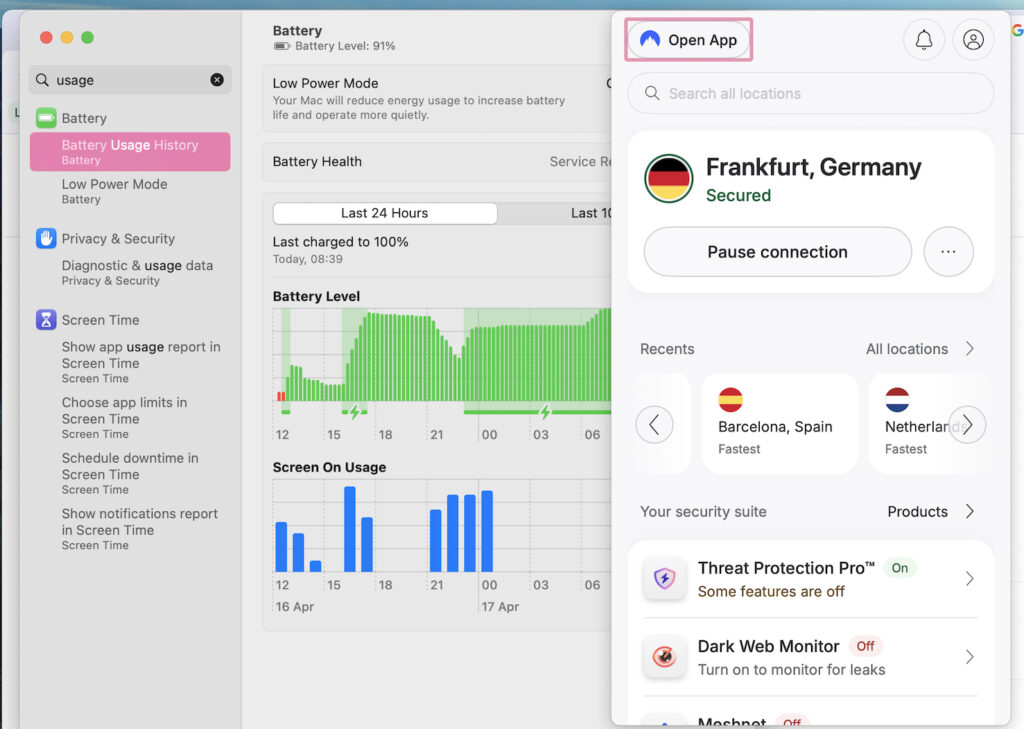
VPNs can affect battery life, especially on laptops. I monitored energy usage through Activity Monitor.
NordVPN does consume additional power, but the impact is moderate. It is noticeable during long sessions, but not enough to be a dealbreaker.
Compared to some heavier VPN clients, it performs reasonably well. Still, if your Mac already struggles with storage or system load, issues like system data is huge on macos can indirectly impact performance and battery behavior.
Security features
NordVPN includes all the expected security features. The most important one is NordLynx, which balances speed and encryption effectively.
The kill switch ensures that your connection is blocked if the VPN drops. Threat Protection adds another layer by blocking trackers and malicious domains.
These features are easy to enable and do not require technical knowledge. For broader system protection and cleanup, it also helps to periodically how to clear mac cache the ultimate guide, especially if you notice slowdowns over time.

Privacy and trust
NordVPN promotes a no-logs policy and has undergone independent audits. This is a positive sign, but like any VPN provider, it still requires a level of trust.
The company is based in Panama, which is generally considered privacy-friendly. However, users looking for maximum transparency may want to look deeper into audit details and policies.
Pricing
NordVPN’s pricing is heavily focused on long-term plans. The monthly option is relatively expensive, while the two-year plan offers the best value.
The main issue is renewal pricing. After the initial period, the cost increases significantly. This is something many users overlook.

NordVPN vs other VPNs on Mac
Compared to other VPNs, NordVPN sits in the middle between simplicity and performance.
ExpressVPN offers a more refined experience but is more expensive. Surfshark is cheaper but can feel less consistent. Proton VPN focuses more on privacy but may be less beginner-friendly.
NordVPN strikes a balance, which makes it appealing to most users.
Who should use NordVPN on Mac
NordVPN is a good choice for:
- Users who want a simple VPN that works immediately
- People who stream content regularly
- Anyone looking for a balance between speed and security
Who should not use it
It may not be ideal for:
- Advanced users who want deep customization
- Users looking for the lowest possible price long-term
- Those who need highly specialized configurations
Nord VPN for Mac: Is It A Yes?
NordVPN on Mac delivers a strong overall experience. It is fast, easy to use, and reliable for most everyday tasks.
It is not the most advanced VPN available, but it does not try to be. Instead, it focuses on delivering a smooth and consistent experience, which is exactly what most users need.
If you want a VPN that works well without requiring much effort, NordVPN is a solid choice on macOS.
FAQs Nord VPN Review
Yes, NordVPN works very well on Mac. It offers a simple interface, fast connection speeds, and strong security features like NordLynx and a kill switch. Most Mac users will find it easy to install and use without any technical setup.
NordVPN does reduce internet speed slightly, which is normal for any VPN, but the impact is minimal when using nearby servers. On modern Macs, especially Apple Silicon devices, performance remains smooth during browsing, streaming, and downloads.
Yes, NordVPN is considered safe on macOS. It uses strong encryption, supports secure protocols like NordLynx, and includes features such as Threat Protection and a kill switch to prevent data leaks if the connection drops.
Yes, NordVPN works reliably with Netflix on Mac. It allows you to access different regional libraries, and in most cases, streaming works without buffering or connection issues when using optimized servers.
The best protocol for most Mac users is NordLynx. It is based on WireGuard and offers the best balance between speed and security. It is also the default option in the NordVPN app, so most users do not need to change anything manually.


0 Comments