Apple Releases iPadOS 26.4.2 Update to Fix Bugs and Boost Security

Apple has officially rolled out iPadOS 26.4.2, a small but important update focused on fixing bugs and strengthening security. While it doesn’t introduce new features, this release addresses a critical vulnerability and improves overall system stability—making it a must-install for most iPad users.
What’s New in iPadOS 26.4.2
Key Security Fix You Should Know About
The highlight of iPadOS 26.4.2 is a serious security patch affecting notifications.
- Apple fixed an issue where deleted notifications could still be stored and retrieved on the device
- This flaw could expose sensitive data, even after users thought it was removed
- In some reports, similar vulnerabilities were linked to message data recovery from system-level storage
In short: this update closes a privacy loophole that could potentially expose personal information.
General Bug Fixes and Stability Improvements
Like most “.x.2” updates, this one focuses on behind-the-scenes improvements:
- Fixes for minor system bugs
- Improved performance and reliability
- No new features or interface changes
These updates might seem small, but they often resolve annoying issues that affect daily use.
Should You Install iPadOS 26.4.2?
Yes—Especially for Security Reasons
Even if you’re not experiencing bugs, this update is important because:
- It patches a real security vulnerability
- It improves overall system safety
- It prevents potential data exposure
Apple itself recommends keeping your device updated to maintain security.
Who Should Update Immediately
You should install this update right away if you:
- Store sensitive data on your iPad
- Use messaging apps frequently
- Want the latest security protections
How to Update Your iPad
Updating is simple:
- Open Settings
- Tap General
- Select Software Update
- Tap Download and Install
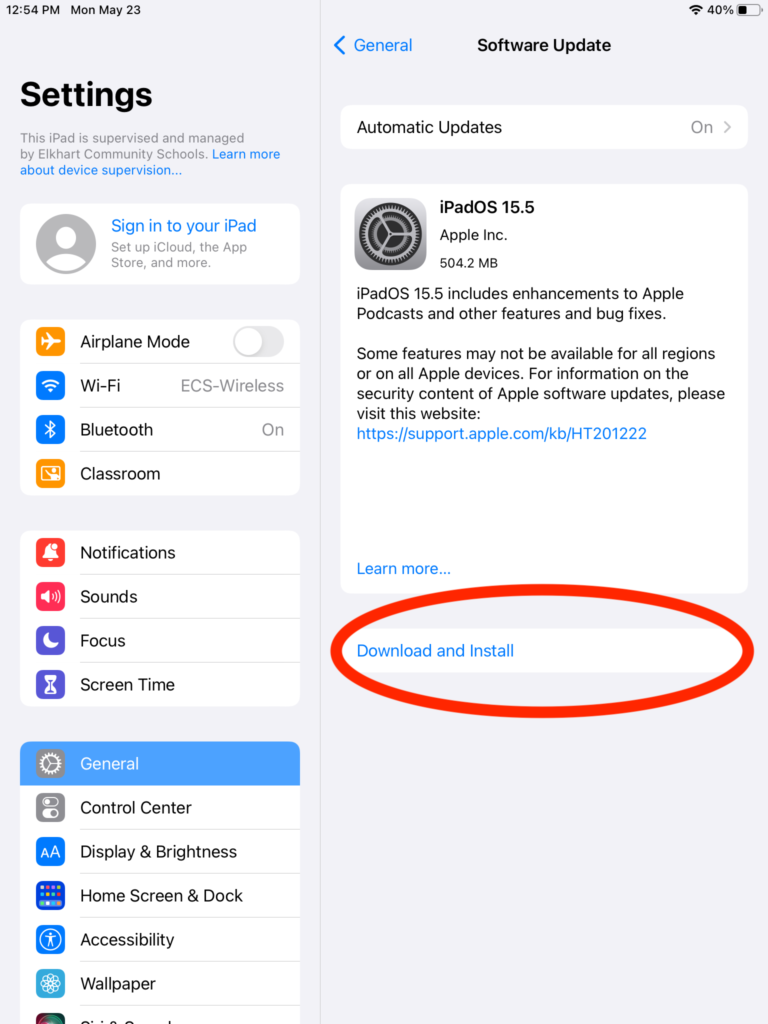
Make sure your iPad is connected to Wi-Fi and has enough battery (or is plugged in).
Final Thoughts
iPadOS 26.4.2 may not look exciting on the surface, but it plays a crucial role in protecting your data. With a key fix for notification privacy and general bug improvements, this update is one you shouldn’t ignore.
If you’ve been delaying updates, this is a good time to install it—especially with security fixes involved.




0 Comments